
AICrisis1.2 - App Store
You'll be able to see results in few seconds.
Publisher Description
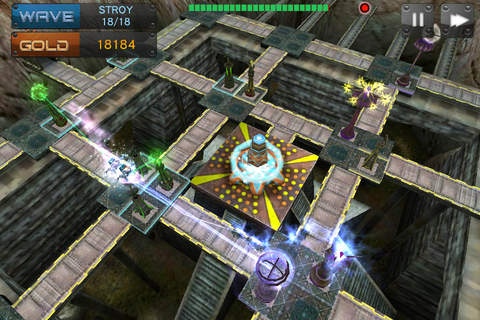
AI Crisis is a strategy game where you spend resources on building towers that destroy waves of incoming enemies. As you kill more enemies, your resources grow. It's a combo of strategy and puzzle play, there are different ways you can beat a level.
Features:
- Universal-App for iPad, iPhone and iPod.
- Powerful weapon system 15 tower types with 3 levels of capability. Each tower has unique trade offs that affect ideal placement.
- 16 enemies with different attributes. The enemy with special skills may destroy your defensive line.
- Reasonable balance of weapons system and enemies system, need to combine different towers to deal with enemy forces.
- Each maps can be solved in many different ways, with increasing rewards for improved efficiency.
- Each map includes Stroy mode , challenge mode and Endless mode.
- In endless mode, eneies show up randomly, giving infinite possibility.
- IAP offers Ultra towers which can reverse the situation.
- The help system in each level will have the corresponding game tips.
- Realistic 3d environments, like green space, barren hills, snow, volcanoes, bare rock.
- Background music produced by independent music producer.
- Easy to operate, with different heights of 3D perspective.
Game video:
http://youtu.be/R_uVSr1-56o
Follows us on http://twitter.com/108kmStudio for tips, help and special offers.
Powered by 108km Tech Ltd.
www.108km.com
Requires iOS 4.0 or later. Compatible with iPhone, iPad, and iPod touch.
About AICrisis
The company that develops AICrisis is 108km Tech Ltd. The latest version released by its developer is 1.2.
To install AICrisis on your iOS device, just click the green Continue To App button above to start the installation process. The app is listed on our website since 2012-08-03 and was downloaded 0 times. We have already checked if the download link is safe, however for your own protection we recommend that you scan the downloaded app with your antivirus. Your antivirus may detect the AICrisis as malware if the download link is broken.
How to install AICrisis on your iOS device:
- Click on the Continue To App button on our website. This will redirect you to the App Store.
- Once the AICrisis is shown in the iTunes listing of your iOS device, you can start its download and installation. Tap on the GET button to the right of the app to start downloading it.
- If you are not logged-in the iOS appstore app, you'll be prompted for your your Apple ID and/or password.
- After AICrisis is downloaded, you'll see an INSTALL button to the right. Tap on it to start the actual installation of the iOS app.
- Once installation is finished you can tap on the OPEN button to start it. Its icon will also be added to your device home screen.
Program Details
System requirements
Download information
Pricing
Version History
version 1.2
posted on 2012-08-03
Disclaimer
Official App Store Link
We do not host AICrisis on our servers. We did not scan it for viruses, adware, spyware or other type of malware. This app is hosted by Apple and passed their terms and conditions to be listed there. We recommend caution when installing it.
The App Store link for AICrisis is provided to you by apps112.com without any warranties, representations or guarantees of any kind, so access it at your own risk.
If you have questions regarding this particular app contact the publisher directly. For questions about the functionalities of apps112.com contact us.
